

Universal Label
Configurable multi-row labels for Archicad elements
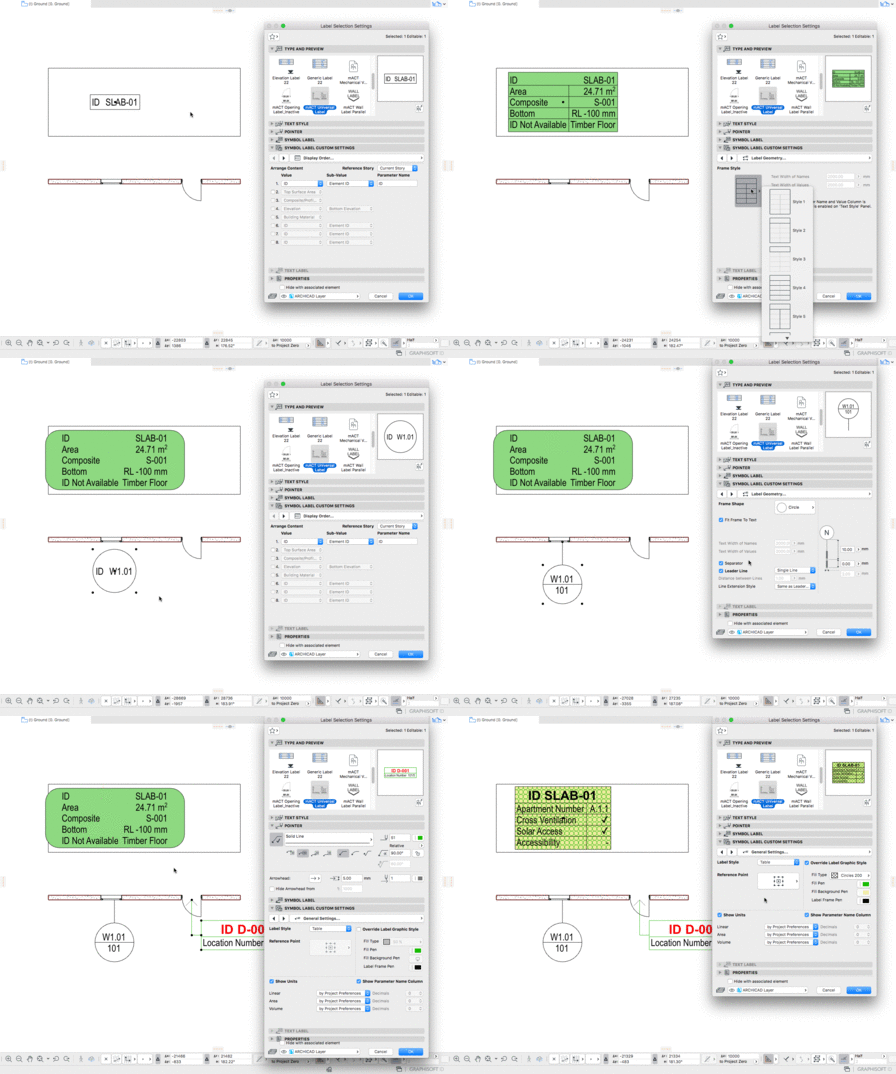
VKTRS Universal Label is an Archicad label tool for assembling several lines of element-driven text—IDs, names, classifications, quantities, areas, and other supported fields—on one label, with control over leaders, arrows, display order, and representation mode.
FUNCTION
What It Does
Provides a flexible label object that can show multiple rows of element-based information on the same annotation.
SYSTEM
How It Works
You place and configure the label against Archicad elements, choose which data rows to show within the object’s supported field set, adjust leader and arrow behaviour, and tune graphic representation using detailed, symbolic, individual, or model-view-driven modes as appropriate.
Inputs
Archicad 27+, the VKTRS Universal Label object, target elements, selected row types, and graphic settings.
Outputs
Labels on layouts or in views that reflect the chosen data rows and graphic mode.
OPTIONS
Data And Graphics
- Multiple rows of element data on one label (legacy: up to eight rows—confirm in-object)
- Examples of row types on the legacy page include element ID, name, classification, properties, quantities, areas, surfaces, elevation references, dimensions, composite, and building material
- Leader lines and arrow options
- Display order and label tool settings
- Graphic modes: detailed, symbolic, individual, model view options
- Object instructions for full behaviour
IMPACT
Why It Matters
It reduces one-off custom label setups by concentrating common annotation patterns into one configurable object.
USE CASE
Consistent Annotation
A team needs consistent, information-dense labels without rebuilding text blocks for every element type.